> For the complete documentation index, see [llms.txt](https://docs.remote.it/llms.txt). Markdown versions of documentation pages are available by appending `.md` to page URLs; this page is available as [Markdown](https://docs.remote.it/developer-tools/zero-trust-kubernetes-access.md).
# Zero-Trust Kubernetes Access
Run a single Remote.It agent pod inside your cluster to reach any ClusterIP service, with zero inbound rules and nothing exposed to the internet.
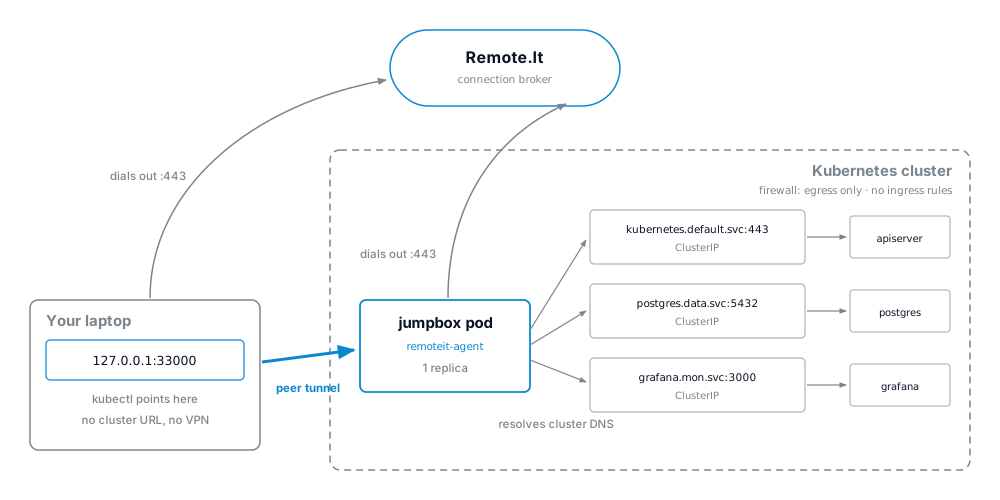
You can run the Remote.It agent as an ordinary pod inside your Kubernetes cluster and use it as a jump server to every service in that cluster. Because the agent is a pod, cluster DNS and ClusterIP addresses resolve normally, so a single jumpbox can reach your API server, your databases and your internal dashboards without exposing any of them to the internet.
Everything the agent does is outbound. Nothing in the cluster listens for an incoming connection, so you can keep all ingress blocked and still let your team, your contractors and your CI reach what they need. This works the same way on a managed cluster, on bare metal, and on clusters behind CGNAT where the node addresses are transient or unknown.
## How it works
Both ends open their own outbound session to Remote.It, so the tunnel between them is established from the inside and the cluster never accepts an unsolicited connection. On your own machine the connection appears as a port on `localhost`, which means `kubectl`, `psql` and your browser behave exactly as they would if you were running them inside the cluster.
## Where this fits
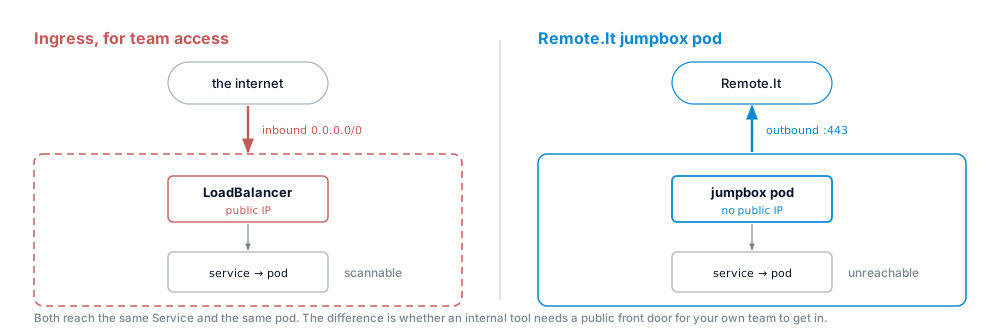
The jumpbox is for reaching internal services as an operator or a team member — your API server, a database, a staging environment, an admin dashboard. It is not a way to serve public traffic. It does not balance load, it does not terminate TLS for the internet, and it does not scale with demand, so keep your Ingress and your load balancer for the things your users hit.
What it does replace is the Ingress or LoadBalancer you stood up *only so your own team could get in* — along with the public IP, the inbound rule and the IP allow list that came with it.
## Deploy the jumpbox
You will need:
* A Remote.It account
* `kubectl` access to the cluster with permission to create a Deployment, a Secret and a PersistentVolumeClaim
{% stepper %}
{% step %}
### Retrieve your registration code
Log into [app.remote.it](https://app.remote.it) or the Remote.It Desktop app with the account which will own the jumpbox.
Click **+** (add device) and select **Docker**. Copy the registration code out of the generated command — it is the value of `R3_REGISTRATION_CODE`.
{% endstep %}
{% step %}
### Create the secret
```bash
kubectl create secret generic remoteit \
--from-literal=registration-code=""
```
{% endstep %}
{% step %}
### Apply the manifest
{% code title="remoteit-jumpbox.yaml" overflow="wrap" lineNumbers="true" %}
```yaml
apiVersion: v1
kind: PersistentVolumeClaim
metadata:
name: remoteit-identity
spec:
accessModes: ["ReadWriteOnce"]
resources:
requests:
storage: 64Mi
---
apiVersion: apps/v1
kind: Deployment
metadata:
name: remoteit-jumpbox
spec:
replicas: 1
strategy:
type: Recreate # the identity volume is ReadWriteOnce
selector:
matchLabels:
app: remoteit-jumpbox
template:
metadata:
labels:
app: remoteit-jumpbox
spec:
containers:
- name: remoteit
image: remoteit/remoteit-agent:latest
env:
- name: R3_REGISTRATION_CODE
valueFrom:
secretKeyRef:
name: remoteit
key: registration-code
volumeMounts:
- name: identity
mountPath: /etc/remoteit
volumes:
- name: identity
persistentVolumeClaim:
claimName: remoteit-identity
```
{% endcode %}
```bash
kubectl apply -f remoteit-jumpbox.yaml
```
The pod registers itself within a few moments and appears in your Remote.It device list.
{% endstep %}
{% step %}
### Add the services you want to reach
Select the new device in the Remote.It application and click **+** (Add Service). Set the **Service URL** to the cluster address you want to reach, using ordinary cluster DNS:
| Target | Service URL |
| --------------------- | -------------------------------------- |
| Kubernetes API server | `kubernetes.default.svc:443` |
| A Postgres database | `postgres.data.svc.cluster.local:5432` |
| An internal dashboard | `grafana.mon.svc.cluster.local:3000` |
Adding a target is a change on the device, not a redeploy — you do not need to touch the manifest again.
{% endstep %}
{% endstepper %}
{% hint style="warning" %}
**Keep the volume.** The agent writes its identity to `/etc/remoteit/config.json`. Without the PersistentVolumeClaim, the pod registers as a brand-new device every time it restarts and your account fills up with dead entries.
{% endhint %}
{% hint style="info" %}
**One replica, on purpose.** Two replicas are two separate devices, not one highly-available device. Scale the workload you are reaching, not the jumpbox.
{% endhint %}
## Start with the API server
If you only add one service, make it `kubernetes.default.svc:443`.
Once the API server is reachable, `kubectl` works from anywhere — and `port-forward`, `exec`, `logs` and every dashboard that talks to the API ride on top of it. One service covers the whole cluster, so nobody has to add anything when a new workload is deployed.
Add a database or a web UI as its own service when you want someone to reach that one thing *without* giving them cluster credentials.
## Share with colleagues (optional)
You can share the jumpbox, or only specific services on it, by email address — no IP allow lists to maintain.
[Learn more about organizations](https://link.remote.it/support/organizations)
[Learn more about sharing](https://link.remote.it/docs/sharing)
---
# Agent Instructions
This documentation is published with GitBook. GitBook is the documentation platform designed so that both humans and AI agents can read, navigate, and reason over technical content effectively. Learn more at gitbook.com.
## Querying This Documentation
If you need additional information that is not directly available in this page, you can query the documentation dynamically by asking a question.
Perform an HTTP GET request on the current page URL with the `ask` query parameter, and the optional `goal` query parameter:
```
GET https://docs.remote.it/developer-tools/zero-trust-kubernetes-access.md?ask=&goal=
```
`ask` is the immediate question: it should be specific, self-contained, and written in natural language.
`goal` is optional and describes the broader end goal you are ultimately trying to accomplish on behalf of the user. GitBook uses it to tailor the answer towards what is most useful for that goal.
The response will contain a direct answer to the question and relevant excerpts and sources from the documentation.
Use this mechanism when the answer is not explicitly present in the current page, you need clarification or additional context, or you want to retrieve related documentation sections.